I’m sure somewhere on the planet, there’s a second person with an iPhone who doesn’t use GMail, and perhaps that person uses their own self-signed SSL certificate for IMAPS.
When adding a new Account, iPhone iOS 3 setup will pop up a dialog to confirm the shady self-signed certificate. Even with that acknowledged, it will try to connect and eventually time out. The warning doesn’t mention (nor prompt to install) the root certificate, which will make the cogs turn.
Put the CA root cert on any Web server (.crt extension and application/x-x509-ca-cert MIME type), then hit the URL in Safari from the phone.
You’ll see an Install Profile dialog like in the Enterprise Deployment Guide:
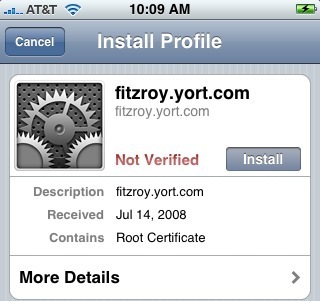
No need for the Configuration Utility or Enterprise kit. The deployment guide says you can also attach the cert to an email, then open that message on the phone. Apple, clicking through the IMAP cert alert should make that cert trusted, or at least warn why it won’t work until the root cert is added (and how).
Update: I’m no longer the last person on the planet not using GMail.